Overview
Basic Structure
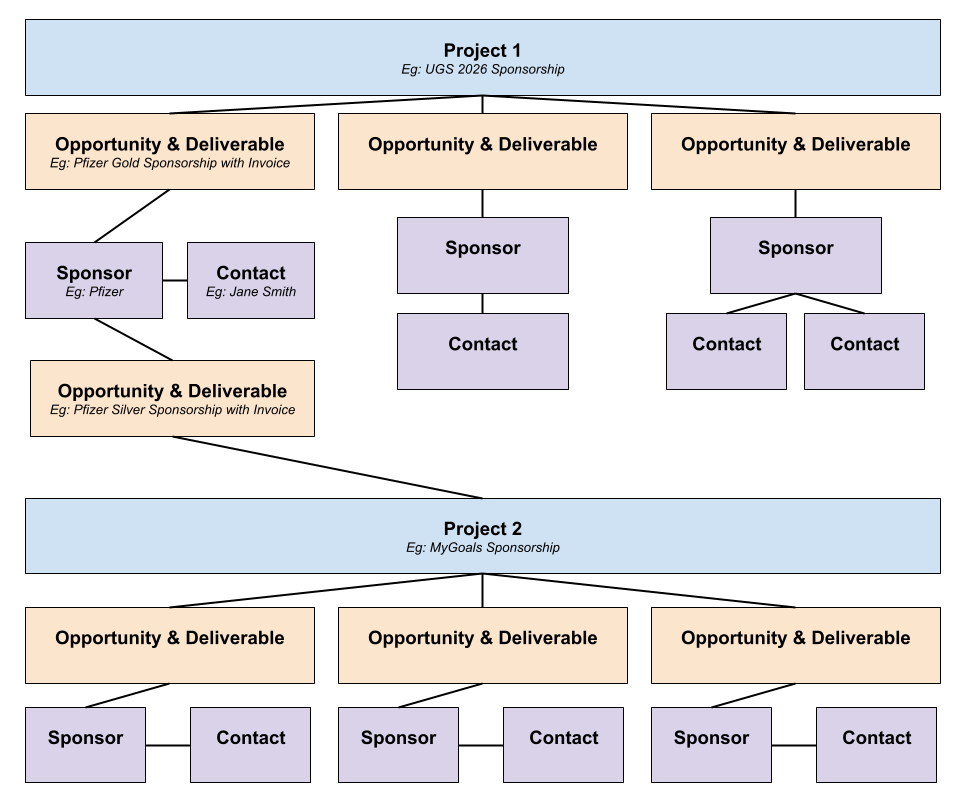
Sponsorship management in AirTable uses several linked excel-like sheets. It starts with a Project, such as Dentistry 2026. This project contains multiple opportunities, each at a specific stage and probabilty of success. Each opportunity is linked to an existing Sponsor, and a sponsor can have multiple contacts. Each opportunity can also have its own separate contact.
Important Terms
Projects are often a collection of sponsorships for a particular CPD conference or program. However they can also be one-off sponsorship management assignments or a part of an overall event sponsorship plan. For example there could be two projects for UGS 2026: Conference Sponsorship and Conference Symposium Sponsorship.
Opportunities & Deliverables are essentially individual sponsorships for a project / conference. These records will also contain invoicing and other planning for that specific project.
Sponsors are individual companies or organisations. If a company has multiple subsidiaries then each should have its own Sponsor record. These records contain basic information about the company as well as any logo files. As well they are connected to contacts.
Contacts are people who represent sponsors. Multiple contacts can be connected to a single sponsor.
Visual Guide
The visual guide below shows two Projects, in this case two Conferences: UGS and MyGoals. There are a total of seven opportunities (or sponsorships) across these two conferences. They share one sponsor, Pfizer, but have seperate Opportunities.
AirTable
To access the Sponsorship managment system, choose "Open Interface" beside "Sponsorship Management"
There are four pages in this interface:
- Projects
- Opportunities
- Sponsors & Contacts
- Sponsorship Report